The Silent Connectors: How Monitor Cables Enhance Your Workstation
At the heart of every efficient workspace lies the often-overlooked monitor cables. These silent connectors play a crucial role in ensuring that your productivity isn’t hampered by connectivity issues. Quality monitor cables guarantee a stable and clear connection between your computer and monitor, allowing for crisp visuals and smooth performance. Whether you’re a gamer, designer, or just someone looking to enhance their workstation, the cables you choose can significantly impact your overall experience.
Moreover, the variety of monitor cables available today—with options such as HDMI, DisplayPort, and VGA—means that you can tailor your setup to your specific needs. Investing in the right cables is as essential as selecting the best hardware for your workstation. Monitor cables not only deliver video signals but also support audio and even data transfer in some cases. The right connections can lead to seamlessly integrated peripherals, allowing you to maintain a clutter-free and efficient workspace.
Keeping your workspace organized is essential for productivity, and finding the right solutions is key. Check out the Top 10 Cable Management Solutions for Monitors to discover innovative ways to manage your cables, reduce clutter, and enhance the visual appeal of your setup.
Choosing the Right Monitor Cable: A Guide to Compatibility and Performance
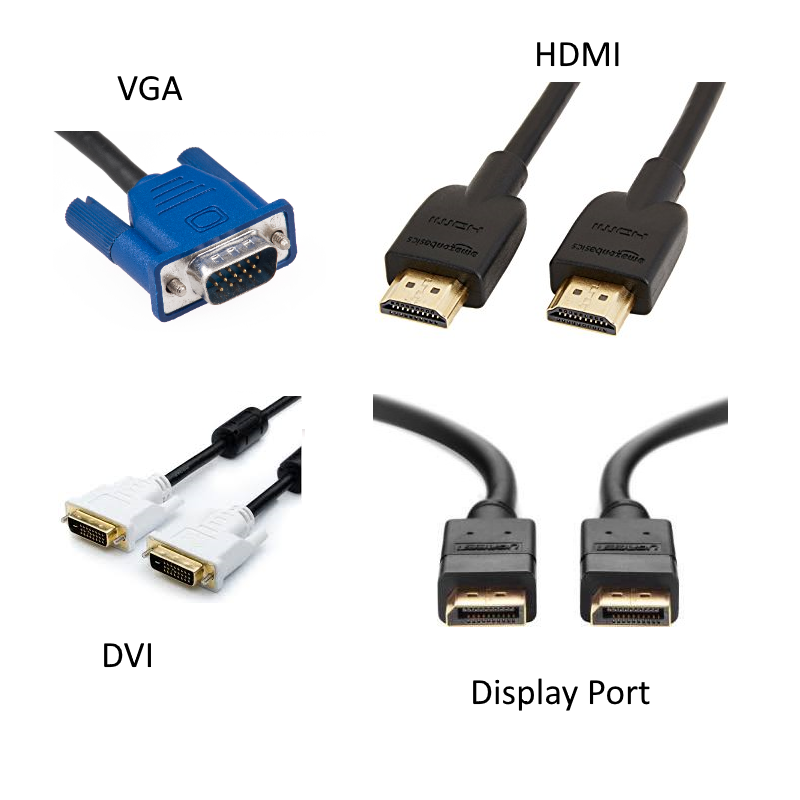
When it comes to choosing the right monitor cable, understanding compatibility is crucial. Not all cables are created equal, and using the wrong type can lead to suboptimal performance or even damage to your equipment. The most common types are HDMI, DisplayPort, VGA, and DVI. Each of these cables serves different purposes and is suited for specific types of connections. For example, HDMI is widely used for high-definition video and audio, while DisplayPort is preferred for high refresh rates and resolutions. Always check your monitor and graphics card specifications to ensure you select the right cable that meets both compatibility and performance standards.
In addition to compatibility, consider the performance features of the cable you choose. Look for specifications such as resolution support, refresh rates, and cable length. A high-quality monitor cable can significantly enhance your visual experience, especially for gaming or professional graphics work. Factors like signal integrity and construction quality also play a vital role in performance. For instance, some cables use shielding technology to prevent interference, which can lead to a clearer picture. By paying attention to these details, you can ensure that your setup not only functions well but also delivers an exceptional visual experience.
What You Didn't Know About Monitor Cables: Debunking Common Myths
When it comes to monitor cables, there are numerous myths that can lead to confusion among consumers. One of the most common misconceptions is that all cables serve the same function regardless of their type. In reality, the performance and compatibility of monitor cables can vary significantly based on the specific model. For instance, HDMI cables support higher resolutions and refresh rates compared to VGA cables, making them more suitable for modern displays. Misunderstanding these differences can result in subpar video quality and a less enjoyable viewing experience.
Another prevalent myth is that more expensive monitor cables always guarantee better performance. While it's true that high-quality materials can improve durability and signal integrity, the price doesn't always correlate with capability. In many cases, a mid-range cable can provide comparable performance to a premium model, particularly if both are appropriate for the intended use. It's essential for consumers to do their research and make an informed choice rather than simply opting for the most expensive option available.